EVEN ThOUGH INFO-SITE IS EASY
TO USE, HERE ARE INSTRUCTIONS TO
HELP YOU TO TAKE THE MOST
ADVANTAGE OF USING THIS GREAT
TOOL FOR YOUR BUSINESS.

ADVERTISEMENT



IF YOU HAVE ANY QUESTION
DO NOT DOUBT TO CONTACT US
IF YOU HAVE AN ANDROID…
FIRST
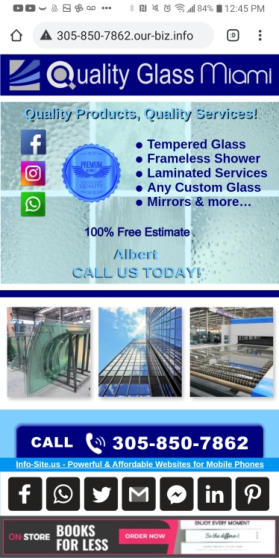
go to your info-site
and click on the 3 dots
usually located on the
top of the screen

SECOND
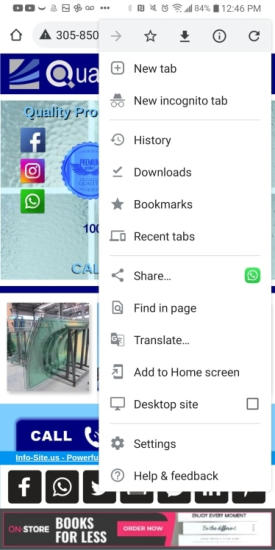
click on the “add to home screen”

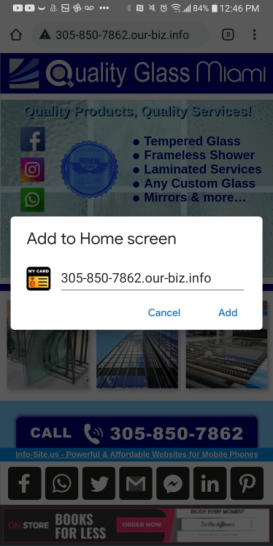
THIRD
click on “add”

FOURTH
click on “add AUTOMATICALLY”
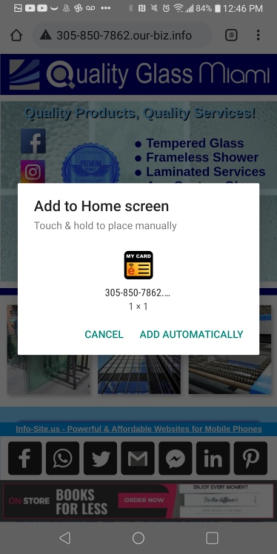

FIFTH
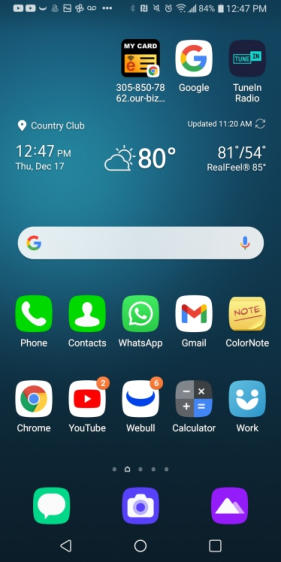
IF YOU GO TO YOUR HOME SCREEN
WHERE YOU SEE ALL YOUR APPS
YOU WILL SEE THE NEW ICON THERE

NOW,
IF YOU HAVE AN iPHONE…
FIRST
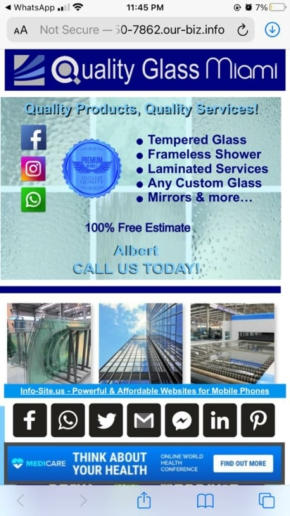
go to your info-site
and click on the little square
with the arrow located
at the bottom of the screen
SECOND
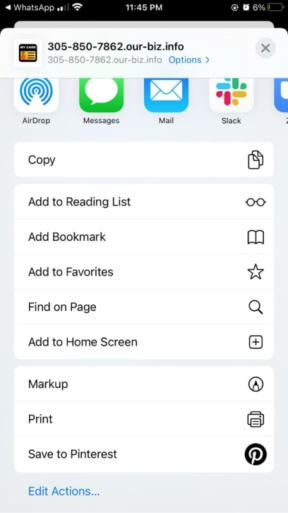
click on the “add to home screen”

THIRD
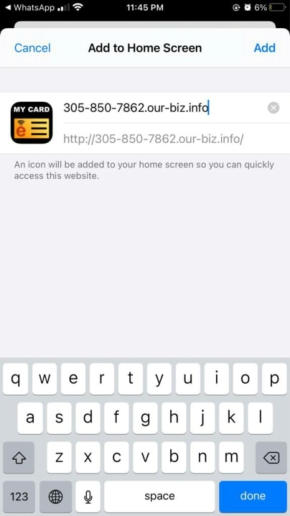
click on “add”
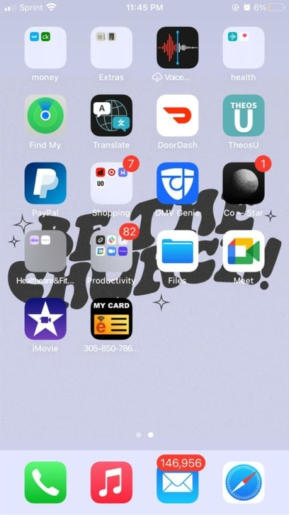
FOURTH
NOW, IF YOU GO TO THE HOME SCREEN
WHERE YOU SEE ALL YOUR APPS
YOU WILL SEE THE NEW ICON THERE


HOW TO CREATE AN ICON OF YOUR
INFO-SITE ON THE HOME SCREEN
of your phone




•
Tempered Glass
•
Frameless Shower
•
Laminated Services
•
Any Custom Glass
•
Mirrors & more…






when people click on these
buttoms, they will be able
to visit your social media
(facebook, instagram, etc…)
when people click on these
pictures, they will make them
bigger, when click again, they
will return to the normal sizes

(try right here to see)

when people click on this buttom,
they will call your business



clicking on this buttom, they will
be able to send you whatapp
messages, even if you are not
a contact on their phones!!!

clicking and holding this buttom,
people will be able to save you
as a new contact on their phones
clicking and holding this buttom,
people will be able to share you
info-site to others, using any apps
on their phones
(facebook, whatsapp, email,
etc)


if your business needs to have a
physical address, it will be linked
to google maps, helping your
customers to find you easier!

clicking on this buttom, customers
and potential customers will
be able to send you emails

SCAN QR CODE TO SAVE CONTACT
INFO TO YOUR MOBILE PHONE



people can scan this code,
to save all your
contact info on their phones.
very powerful & convenient!
how your info-site works
(features)

your info-site can be share using
any of the following located
at the bottom of your info-site
how to get the best results
of your info-site
•
first of all… use it!
•
send it to your customers
•
sent it to potential clients
•
sent it to your contacts
•
place it on all social media
•
add it to your business card
•
put it to your work’s vehicle
•
add it to any paid advertisement
•
add it to free local directories
•
add it to free classifieds
•
add it to your email signature
•
and any other possible way…
•
but, please, use it!!!
if you do not do any of these…
do not expect any result
info-site is a great tool for your
business, but it is not a “magic solution”
INSTRUCTIONS ON HOW TO
BETTER USE YOUR INFO-SITE

